6.6 Multitrack Generators

Multitrack mode has several integrated generators including the Euclidean style generator, drum pattern generator and random generator. These are very useful and creative tools to help build patterns, experiment and explore musical avenues. The interest expands even further when adding randomization.
Euclidean Style Generator
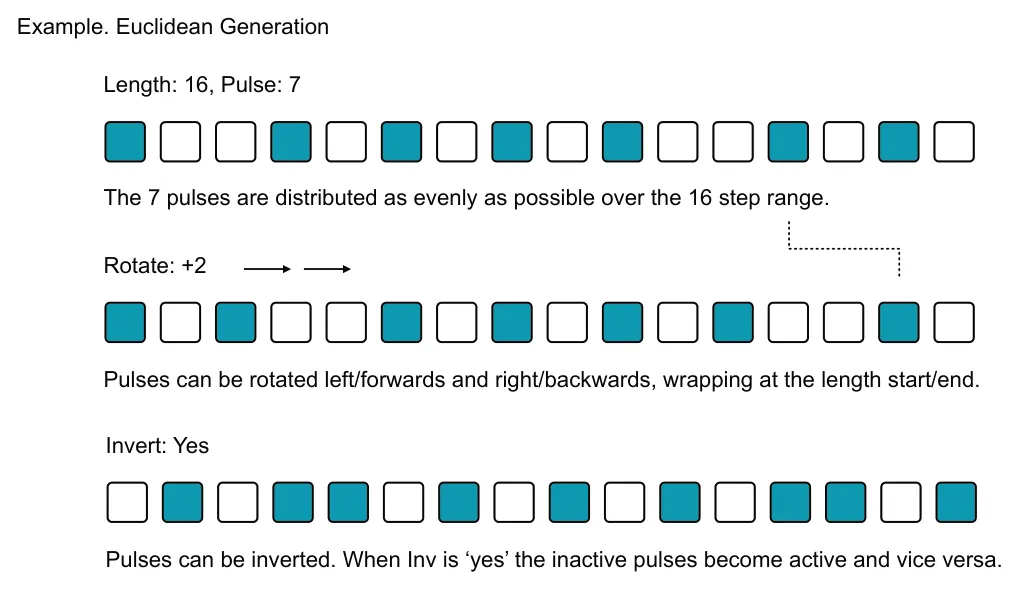
The core concept of a Euclidean generator is to take several parameters and apply a mathematical model to generate a pattern. The two main parameters are the length and the pulses. The Euclidean engine then distributes pulses as evenly as possible across the defined length. Other parameters, for example rotation, can also be applied to enhance the function further. The multitrack Euclidean generator is a destructive process, meaning that the pattern generated overwrites all prior steps unless they are locked or fixed in which case they are retained.

Select Track. Tap [Pad] - Column 1
The generator is applied to the selected multitrack, track. Select track before applying.
Generator Menu. Tap [Gen] Generator Menu. Tap [Gen]

Opens the Euclidean generator parameter options for the specifically selected track.
To change a Euclidean parameter without applying it to the track, hold [Shift] + turn knob for the respective parameter.


Drum Pattern Generator
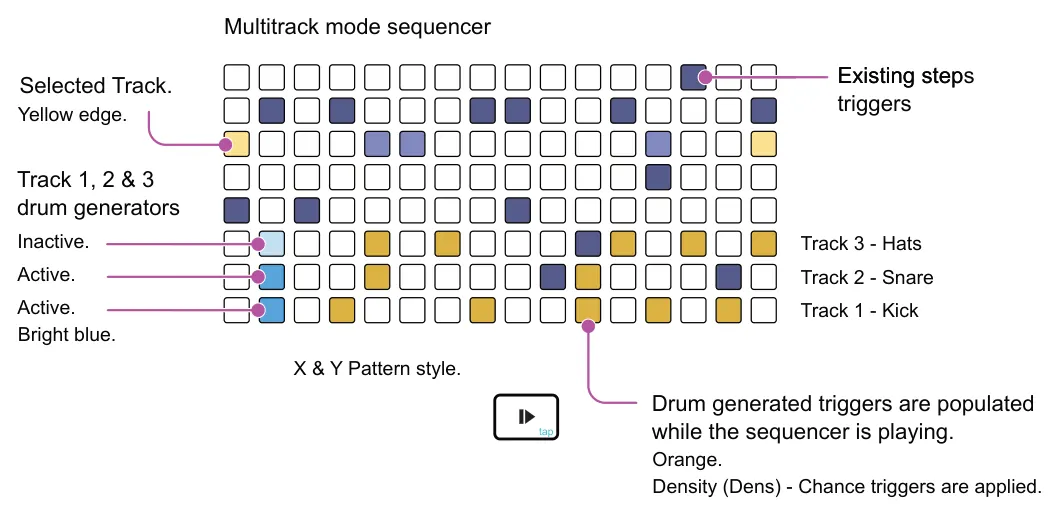
The drum pattern generator is an exclusive, non-destructive function in multitrack mode that supports the focus on drum and percussion generative sequencing. The drum pattern generator has 3 engines, each found on tracks 1, 2 and 3 and especially aimed at kick, snare and hi hat rhythms.
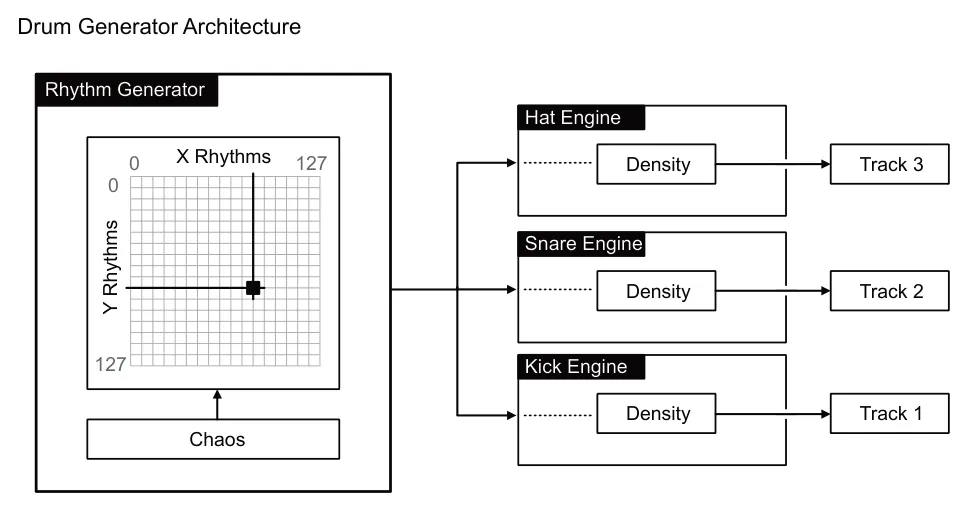
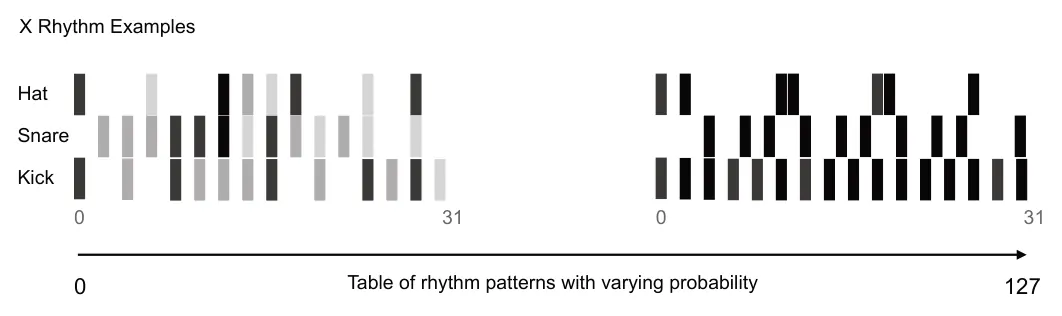
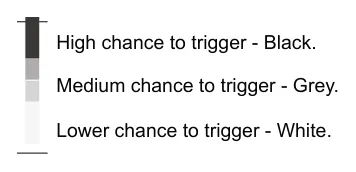
The X & Y parameters define the source model for generating rhythmic patterns. In addition, the option to add some randomization is possible using the chaos parameter. These 3 parameters are common to all engines and therefore apply to all tracks. Density sets the change of triggers being generated. Density is set exclusively for each track to apply triggers and add variation. The pattern is generated on each cycle of the playing pattern. Existing active steps are retained when using the drum generator.
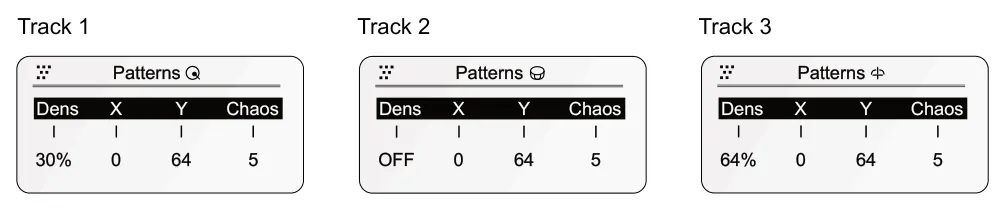
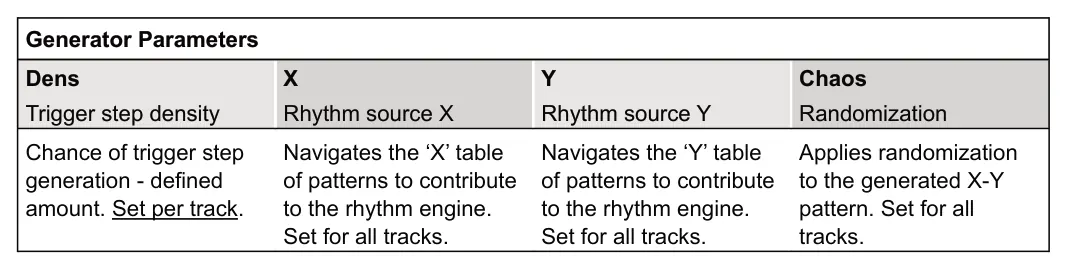
The pattern must be playing for the drum pattern generator to operate. It is also recommended that to get the full benefit, set the length to 32 steps. Other lengths are possible but the rhythm generators are optimised to work over a 32 step range.
Playing Drum Tracks. Press [Play]
The tracks must be playing in order to continuously generate the track drum patterns.
Drum Generator Commands
![Drum Pattern Generator diagram: Activates or deactivates the track 1,2 or 3 drum pattern generator option. Column 2 pads. Display will indicate the state selected. Activate Drum Track. Hold [Randomizer] + [Pad] +](../../img/oxi-one-mkii/multitrack-generators/multitrack-generators-011.webp)
![Drum Pattern Generator diagram: Track 4 Track 1, 2 & 3 pads are lit blue on column 2 when in the drum generator. Soft blue pads are inactive and bright blue are active drum generator tracks. Toggle active / inactive with [Randomizer] + [Pad]. Track...](../../img/oxi-one-mkii/multitrack-generators/multitrack-generators-012.webp)
![Drum Pattern Generator diagram: Hold Seq [1] - [8] for the multitrack sequencer + tap column 2, blue pad. Opens the drum generator option menu for the selected track 1, 2 or 3. + Column 2 Multi Seq](../../img/oxi-one-mkii/multitrack-generators/multitrack-generators-013.webp)
Drum Gen Parameters. Hold seq [1] - [8] + [Pad]
Deconstructing the Drum Generator