



2.14 Pitch Bend
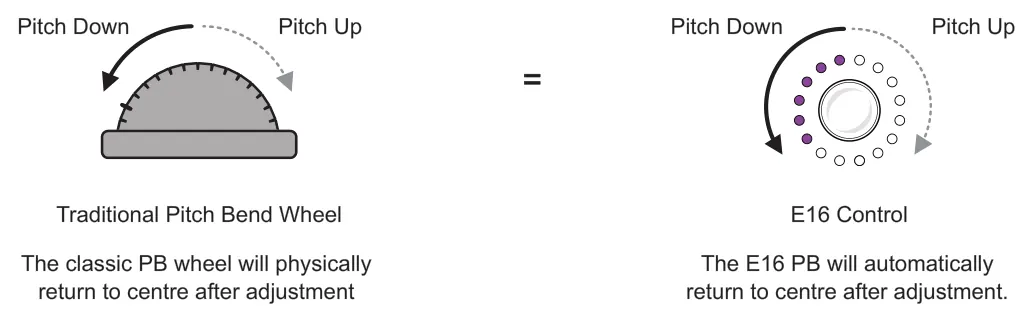
A controller can be set to operate as a Pitch Bend Wheel in the special functions. A pitch bend controller operates from a central position and sends PB messages over MIDI when adjusted positively or negatively. Pitch bend is bipolar. The physical PB behaviour would automatically snap a pitch bend wheel back to centre. This behaviour is replicated on the E16 device for a PB control.
A maximum of 10 controls per scene can be assigned as Pitch Bend Wheel controllers. An error message is displayed when attempting to set up more than the limit.
Example
14-Bit MIDI Range Min 0 - Centre 8192 - Max 16383
DAWs and Devices may interpret this in % or Semitones
| Pitch Bend Options Turn knob to navigate, tap knob to change. | ||
|---|---|---|
| Function | Description | |
| Abbr | Name Abbreviation | Allows editing of up to 4 characters. This is the label used on the control view for the parameter. |
| Color | LED ring color | Assigns the color for the LED ring indicators. If swap is active then a color can be set for each destination. Represents knob value. |
| Special | PB Wheel | Control set to pitch bend. |
| Delay | Return to centre | Sets the delay time for the control to return to its central default position after turning the knob. This is the time the value will hold at its adjusted setting before returning. Range is 0ms to 5 sec. Default is 100ms and can be edited in 10ms steps. |
| Speed | Return to centre | Sets the speed time for the control to return to its central default position after turning the knob. This is based on the time from the max position to reach the centre. Range is 0ms to 5 sec. Default is 150ms with also the option to set to 'instant' return. |
| Dest1 | Destination 1 | Configure the destination device settings when rotating the control. One device destination can be assigned to each PB controller. |
| Copy | Copy Settings | Copies the control settings. |
| Paste | Paste Settings | Pastes previously copied settings to the selected control |
| Erase | Clear settings | Clears the settings to defaults. |