



2.16 MIDI In
The E16 can channel incoming MIDI through to the selected outputs. This is configured in the Settings > MIDI section. An active, external MIDI clock is also be used by any tempo synchronised recording mode.
In addition external MIDI PC - Program Change messages can be used to change scenes or pages on the device.
- A program change can be used along with a bank select message to change scenes and pages. Bank Select received by the E16 will change the scene while the Program Change message is used to change pages. The MIDI Config 'PC Receive Channel' must be set.
- Alternatively, a PC message can be used to change the scene or the page. This option is set in the MIDI Config 'PC Mode' options. The MIDI Config 'PC Receive Channel' must also be set.
Example: MIDI Input to change a scene.
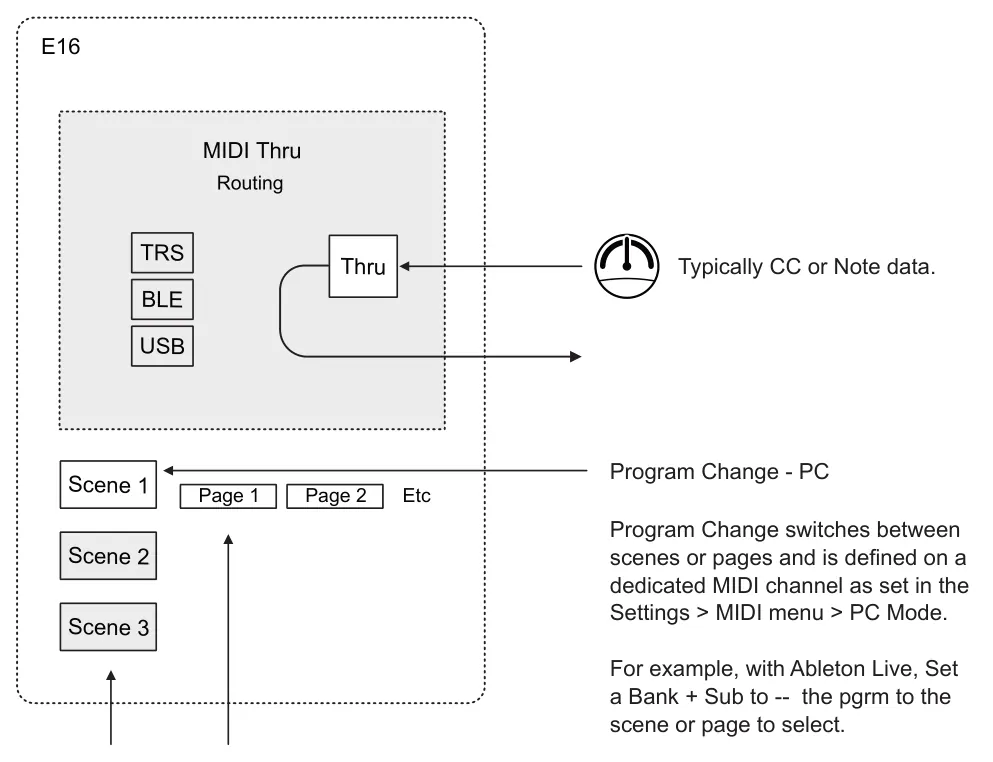
Bank + Program Change
If a bank change is initiated with a program change message, the bank will change the scene and the PC will change page.
For example, with Ableton Live, Send a Bank + Sub as the sub will select the scene, and the pgrm will change the page.
Changing the Scene or Page with a PC Message
- Connect the externally controlling device to a MIDI input on the E16, for example
from PC/Mac to the E16. Ensure the general MIDI settings are correct on the external device in order to send a PC message.
- On the E16, open the system config. In the home screen, press (Knob 8).
- Navigate to the MIDI settings, tap to open.
- Navigate to 'PC Receive Channel' and set this to a dedicated MIDI channel that the external device will send the PC message. Example, set to channel 8.
- Navigate to 'PC Mode' and choose either scene or page. The selected option is what will be changed by the incoming PC message.
- Sending a PC message without any bank or sub bank data on the defined channel
will then change the scene or page to the PC message value. For example PC 1 will select Scene 1, PC 4, selects Scene 4. Scenes 1-16 can be selected directly by PC.