



The OXI E16 is focussed on MIDI parameter control of one or more external devices, whether a PC/Mac Digital Audio Workstation, synths or audio effects. Multiple connectivity options are available for a high level of flexibility across devices. These include USB-C, Bluetooth Low Energy or MIDI TRS In and Out. The target device MIDI accessible parameters such as CC - Control Change, PC - Program Change, Pitch Bend, Notes and more can be controlled by the E16. The choice of connectivity method will depend on the application and the devices to connect with. It is important that you have knowledge on the destination device MIDI parameter mappings to align the E16 controls. It is also possible to use instrument definitions with the E16 to quickly set predefined parameter mappings. The MIDI configuration documentation from the equipment manufacturer will provide details of the MIDI Mappings, especially the CC definitions used with each device.
2.1 Connectivity Overview
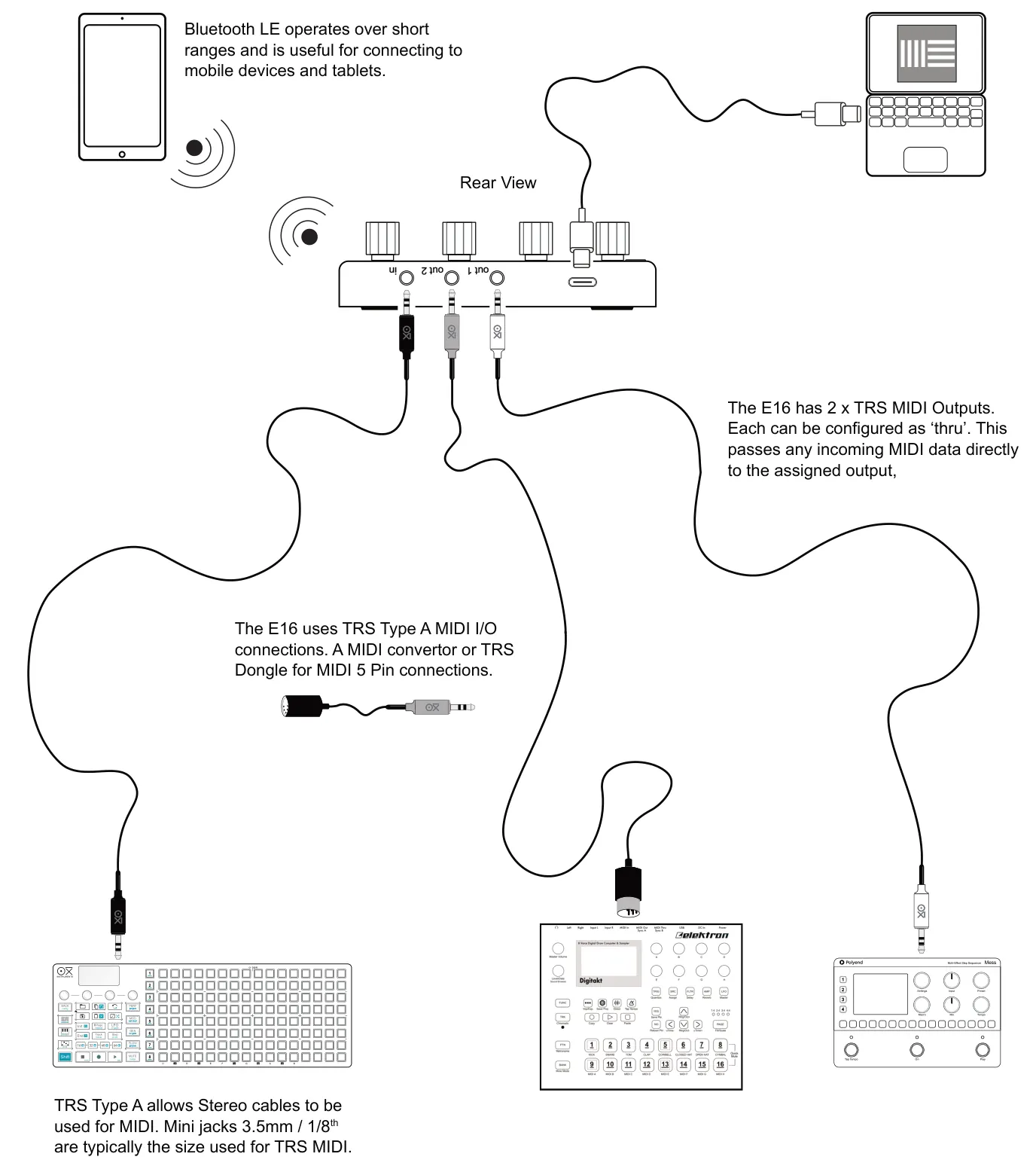
OXI E16 has a variety of connection options including Bluetooth Light Energy, TRS MIDI and USB MIDI. This allows multiple devices to be connected and the choice of connection gives flexibility for the application required. A typical setup is shown in the illustration although many other options are possible.
2.2 MIDI USB Connectivity
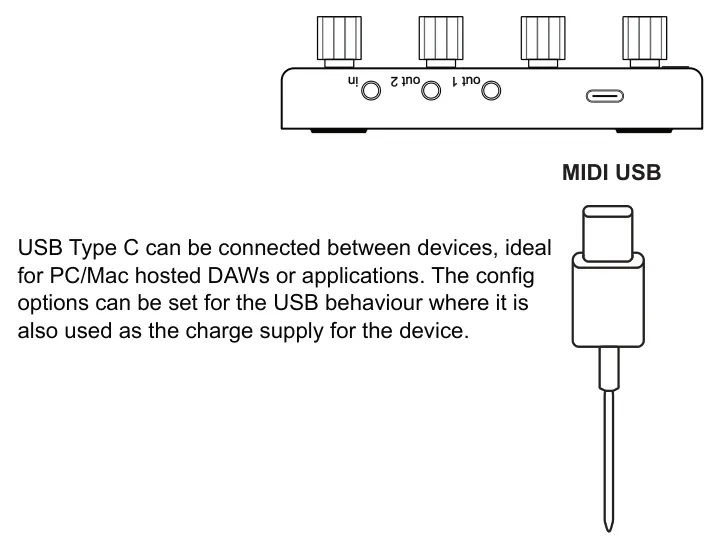
It is possible to connect the E16 to another device directly with the USB-C connection. Bear in mind that this is also the power supply input so any connected device, for example a PC or Mac, must be able to supply the 5V, 200mA source..
Rear Edge
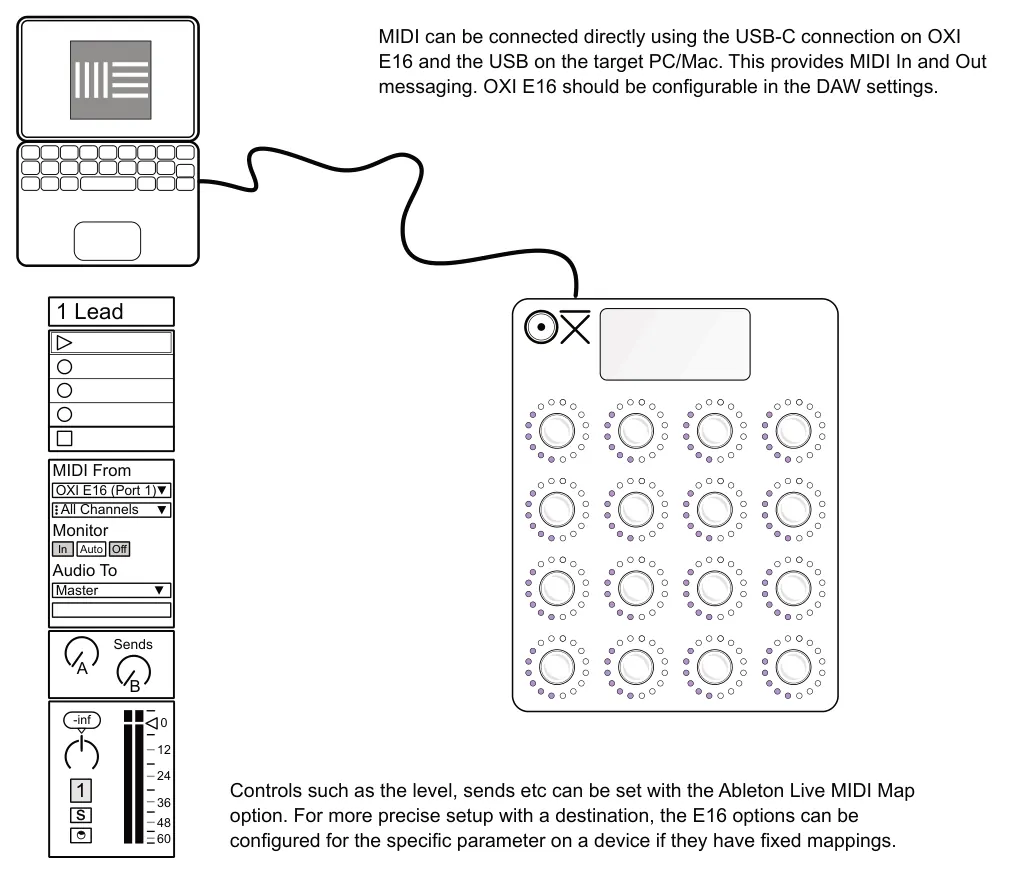
Example: MIDI USB OXI E16 to Mac / PC Ableton Live DAW
2.3 MIDI TRS Connectivity
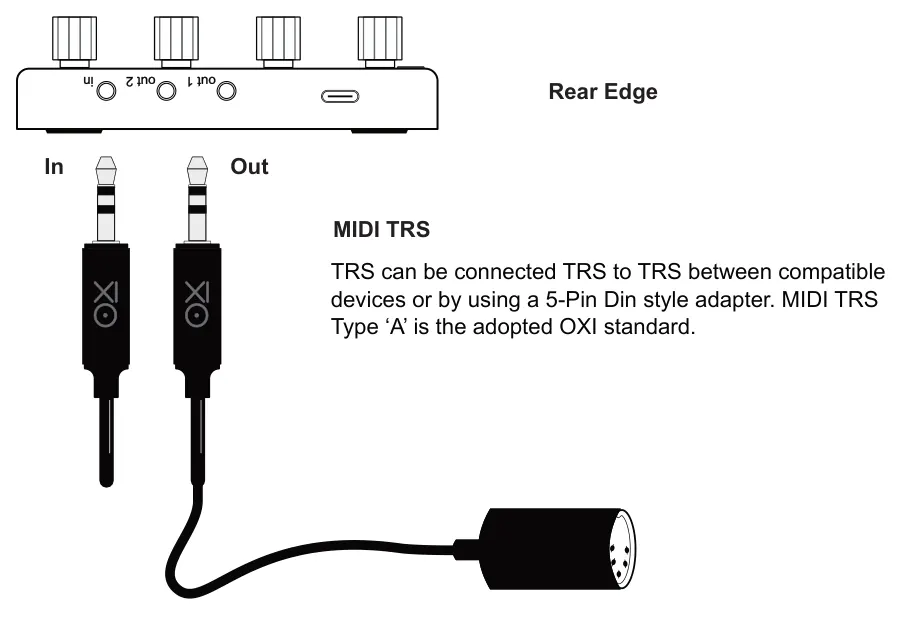
OXI E16 can be used to control MIDI devices using a TRS MIDI connection in and out. This can also connect to the classic MIDI 5 Pin Din style connections with a type ‘A’ adapter / interface or by using a TRS Stereo cable if both devices are type A compatible.
MIDI In / Out / Thru
MIDI Thru can be set in the Conf > MIDI settings for TRS, USB or BLE. If set to On, MIDI messages from this input will be echoed to the other MIDI outputs. If set to off MIDI inputs will not be automatically be passed through the device to an output and only E16 generated messages are output.
2.4 MIDI Bluetooth Connectivity
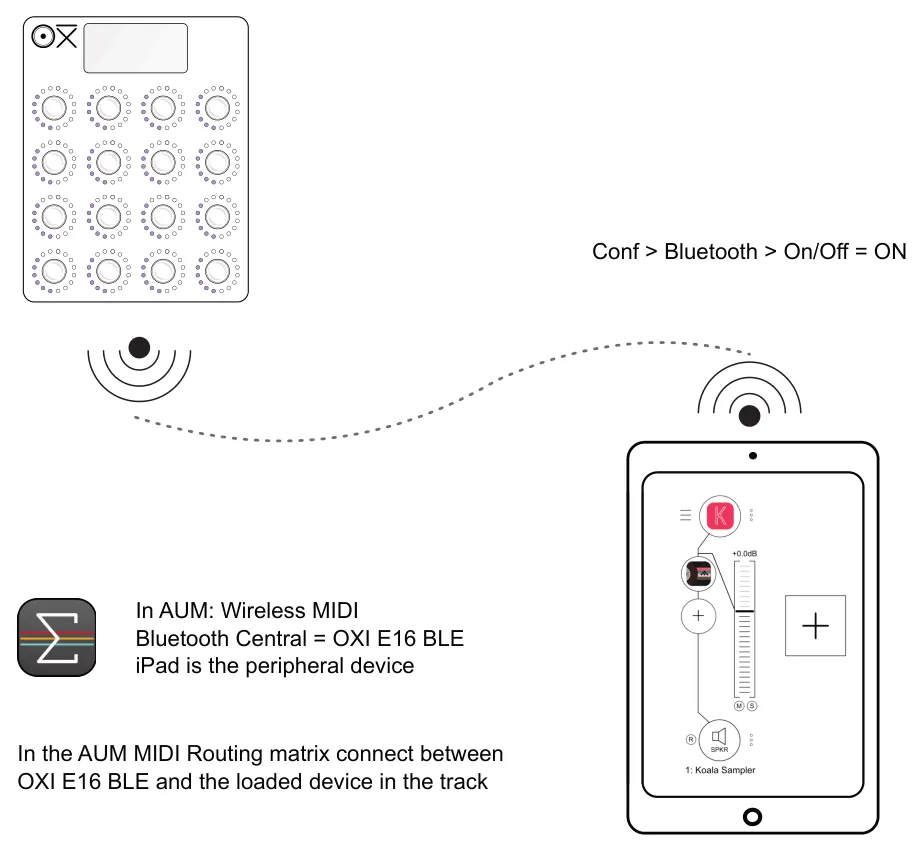
OXI ONE uses BLE MIDI or Bluetooth Low Energy for wireless communications. BLE can sometimes be technically challenging to set up on some devices so it is advised to use a MIDI dongle such as WIDI Master, WIDI Jack or WIDI uHost when using devices like iPads. Android can be more robust for MIDI BLE.
Ensure the external device has bluetooth turned on in order to pair. The pairing process will be determined by the device itself and may be different between devices. The E16 will show up as a Bluetooth central MIDI device not a peripheral.
On the OXI E16, turn Bluetooth on in: Conf > Bluetooth > On/Off.
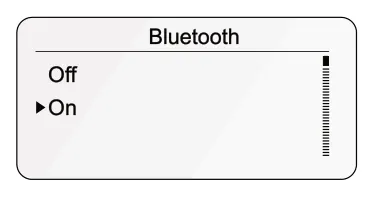
Once the option is selected, turn the lit knob to select On or Off and then tap the knob to confirm. The bluetooth connection will be active or inactive.
Example: MIDI Bluetooth OXI E16 to iPad AUM App.
2.5 MIDI Ports & Channels
OXI E16 has the ability to interface with multiple MIDI ports, each with 16 MIDI channels. Port A and B are the available ports integral to the E16 device but use the same physical output. These may be identified as 1 and 2 on some external DAWs and devices. The output ports and the 16 channels in E16 can be assigned at a page level for all controls within that page or at an individual control level, per destination.
Example: Channel and Output Configuration

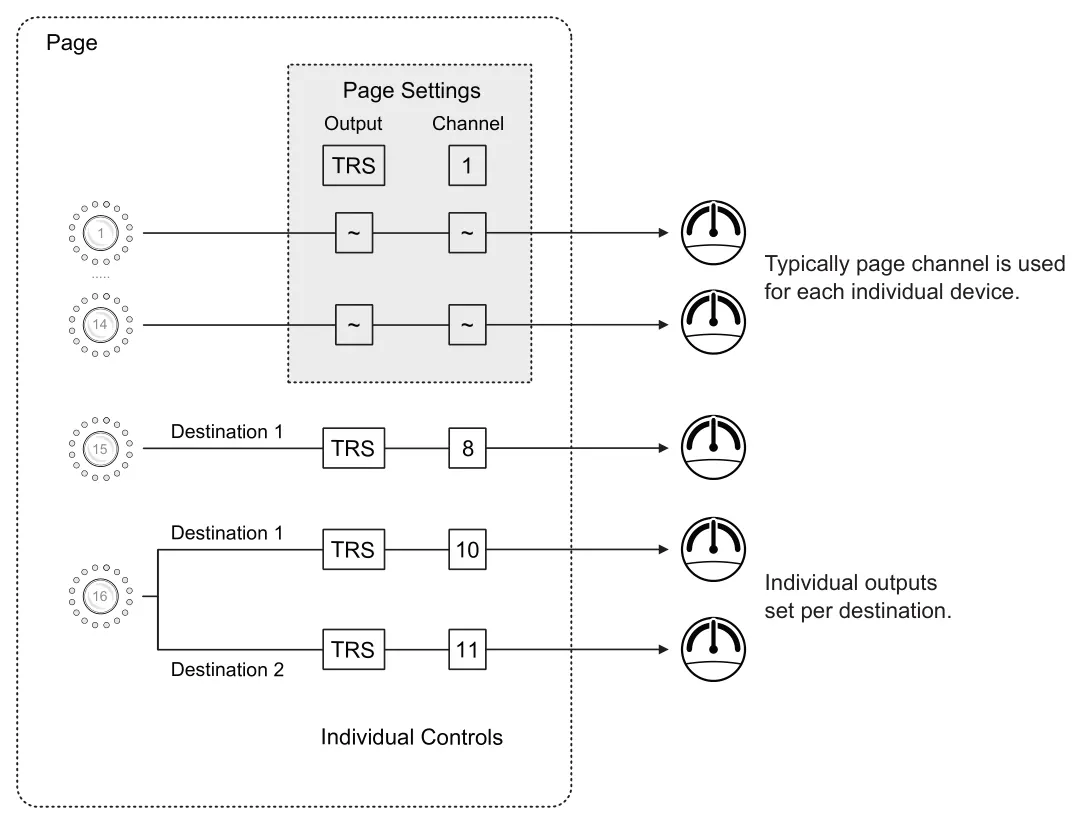
Page level output and channel can be set at the individual control level. This means the control destination uses the collective page level settings. If the control destination setting has a dedicated output and channel number assigned then this will be used for this destination.
2.6 Control Settings Overview
The E16 can control a variety of MIDI message formats. The default parameter configuration is control change but each knob can be configured individually. The configuration and setup options will depend on the parameter type. Controls are configured in the control settings, accessed from the control view.
![2.6 Control Settings Overview diagram: Directly Edit a Control Hold (Knob) to edit + Tap [Shift]. Turn (Knob) to select and tap to edit the selection. + CC3 S. 1-P. 1 CC1 CC2 CC3 CC4 Ctrl 3 Page Scene Abbr. CC3 CC9 CC10 CC11 CC12 CC5 CC6 CC7 CC8 Special...](../../img/oxi-e16/connect-and-control/connect-and-control-009.webp)
Each parameter can control:-
- 2 x Control Destinations - Variable MIDI message sent by turning the rotary knob.
- 1 x Push Control - Discrete MIDI message sent by pushing the rotary knob.

Output operates over a defined range to affect a destination parameter. For example, CC over a 0-127 range for a filter cutoff control.
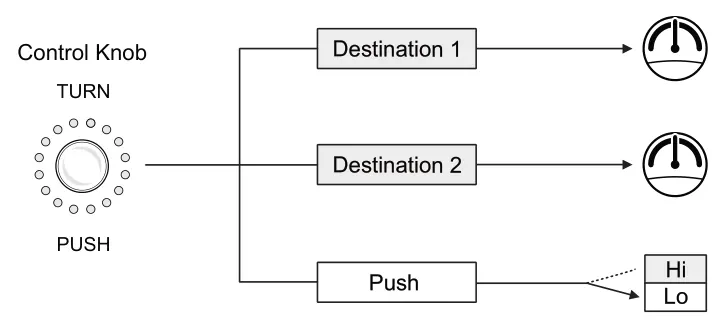
Output operates over a defined range to affect a destination parameter. For example, CC over a 0-127 range for filter cutoff control.
Output operates similar to on/off behaviour with two values. For example, Note value on or off, or CC On/Hi value 127 and Off/Low value 0.
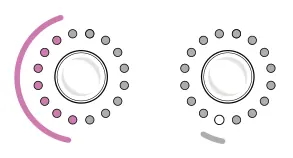
The rotary LEDs will indicate the value of a rotary control, A single, lit LED on the knob control will indicate if a configured push + toggle state is on or off.
The push command can also initiate scripts and navigate pages.
2.7 Configuring a Control
The E16 can control a variety of control types. The settings menu is the starting point for configuring on board the device. Also a quicker solution is to use the OXI App which contains a dedicated scene editor, used to configure the pages and controls.
The control settings are accessed from the control view. Hold (Knob) + Tap [Shift] to edit the selected control. This will configure the control in the current scene and page of parameters. Turn the lit knob to scroll and tap to select an option to edit.
| Generic Parameter Options Turn knob to navigate, tap knob to change. | ||
|---|---|---|
| Function | Description | |
| Abbr | Name Abbreviation | Allows editing of up to 4 characters. This is the label used on the control view for the parameter. |
| Color | LED ring color | Assigns the color for the LED ring indicators. If swap is active then a color can be set for each destination. Represents knob value. |
| Special | Encoder Options | Can be set to Off or a special function. Snapshot Morph will capture and store an A and B value to assign as the knob range. Looper Capture will allow automation to be recorded by the knob when in the control view. Looper Playback, a recording can be controlled by pressing the knob. Swap Destination will enable switching the knobs control between destination 1 or 2 when pushing the knob. Random will set the value of parameters on the page to a random value. Pitch Bend Wheel sets the control to a MIDI pitch bend controller. |
| Dest1 | Destination 1 | Configure the destination device settings when rotating the control. Two device destinations can be assigned to each parameter. If destination 1 is set to Off, destination 2 will be unavailable. |
| Dest2 | Destination 2 | |
| Push | Knob push behaviour | Configure the destination behaviour for the push the control and how its displayed. If connected devices or DAWs send bidirectional MIDI back when a button is pressed, then the button will be toggled to show the new state. Toggle displays an LED tag status on the ring. |
| Copy | Copy Settings | Copies the control settings. |
| Paste | Paste Settings | Pastes previously copied settings to the selected control |
| Erase | Clear settings | Clears the settings to defaults. |
Editing a Control
- The settings edit menu is accessible from the control view. Tap [Shift] if necessary to
backup the menu to the main home screen. Select a scene by tapping the associated knob to choose the scene and its control view.
- To directly edit a control hold the (Knob) + Tap [Shift]. This is performed from the
control view. The editor will open for the selected control.
- The editor tab should be open for 'Ctrl'. If not, hold [Shift] and tap (Knob 1) to choose
the controller settings. The page and scene settings tabs are also available.
- To navigate, turn (Knob 1). Scroll to the desired option and tap (Knob 1) to edit. The
selected option is highlighted and when in edit mode the '►' tag label is shown.
- Once editing is complete tap [Shift] to backup and exit. After any edits the scene can
be saved. This option is presented when backing up to the home scenes page.
- Note that a controller's settings can also be erased, copied and pasted to another
control from within this menu.
2.8 Control Colors
Each control can be set with its own color scheme for the control functions. This sets the color of the rotary LED ring for each control knob and its destinations and is useful as a visual reference. The color setting is defined at a control level for each control knob and is set in the control editor. The color spectrum is chosen within a parameter range of 0 to 100.


When setting the color value in the edit menu, the knob LED color will change while editing making it easy to select visually rather than by numbers.
The first LED on the rotary LED ring can be set to on for all controls or stay at the default off. This is a visual indicator for the lowest value. This is set in the config settings under System > Color Indicator.
2.9 Controller Destination Options
A variety of parameter types can be controlled by the E16. These are setup based on the target device and parameter to modulate. The type of control is set up per destination. There are three options per knob, two rotary destinations and one push destination. Select 'Dest 1', 'Dest 2' or 'Push' to configure each destination for the selected knob. If destination 1 is set to Off, destination 2 will be unavailable.
The available destination menu options will change depending on the destination.
CC Abs - Control Change Absolute
Control change sends a value that is used to affect a destination parameter over a defined range. Absolute is the most common application of CC control. The maximum range for absolute control is from 0-127. An example is to control a filter cutoff sweep with a CC parameter. The control sends an absolute value between 0-127 to the destination.
| CC Abs | ||
|---|---|---|
| Function | Description | |
| Instr. | Instrument Def | Select an instrument definition which contains preset settings for a selected destination instrument. These can be managed in the OXI App. Option also to set to the default 'None'. |
| Param. | Parameter | Select an instrument definition to enable access to the parameter option. When an instrument definition is loaded the parameter mapped will be available in this setting. |
| Type | Parameter Type | Off, CC Rel1, CC Rel2, CC Abs, CC14 (High Resolution), PC, PB, AT, Note, NRPN, Script |
| Output | Output & Port | MIDI physical output and port. Set to: Same as Page, TRS1, TRS2, USB1, USB2, USB3, BLE, ALL-BLE all except bluetooth, ALL-USB all except USB, or to Off. |
| Channel | MIDI Channel | Communicates MIDI messages on this channel. Set to: Same as Page, 1-16 |
| CC nr. | CC Number | Control Change Number. Sets the number for the CC mapping to a destination parameter. This will match the destination device parameter CC number. |
| Minimum | Min value | The lower minimum value that the CC knob will send out. This is a value between the standard 0-127 standard. Invert by setting Min higher than Max. |
| Maximum | Max value | The upper maximum value that the CC knob will send out. This is a value between the standard 0-127 standard. |
| Anchor | Push anchor value | If push type is set to 'Set to Anchor', this value is used when the knob is pushed, to reset the encoder to this value and also send the value out. |
| Mode | Encoder behaviour. | Sets the behaviour of the encoder rotation. Options are: Div8, Div4 and Div 2 - Divides the encoder resolution by 8, 4 or 2. Acc0,Acc1, Acc2, Acc3 - Encoder acceleration. 0 = no acceleration, normal operation, 3 is max acceleration when rotating. LSp2, LSp4, LSp6 - large step mode - steps values in the 2, 4 or 6 increments selected. Default is 'Scene' which uses the acceleration setting set for the scene. |
| Display | Encoder Scale | How the encoder scale is displayed. Set to : Off - blank display, standard, 127 - Default, 100, 1000 - useful for CC14, B63 bipolar +/-, B63 bipolar +/-, 9999 useful for CC14 or High Res. Always on - Value is always displayed. |
| Learn | Sets listening mode | Sets the device to listen to the MIDI input channel for any MIDI messages. The channel and control received is assigned to the parameter destination settings. |
CC Rel 1 & 2 - Control Change Relative
Control change sends a value that is used to affect a destination parameter over a defined range. Relative mode is useful for interfacing to DAWs and other devices where an incremental change iteration is required. Relative 1 will send a value of 1to increment the control and 127 to decrement. Relative 2 operates the same but uses 63 to increment and 65 to decrement the destination.
| CC Rel | ||
|---|---|---|
| Function | Description | |
| Instr. | Instrument Def | Select an instrument definition which contains preset settings for a selected destination instrument. These can be managed in the OXI App. Option also to set to the default 'None'. |
| Param. | Parameter | Select an instrument definition to enable access to the parameter option. When an instrument definition is loaded the parameter mapped will be available in this setting. |
| Type | Parameter Type | Off, CC Rel1, CC Rel2, CC Abs, CC14 (High Resolution), PC, PB, AT, Note, NRPN, Script |
| Output | Output & Port | MIDI physical output and port. Set to: Same as Page, TRS1, TRS2, USB1, USB2, USB3, BLE, ALL-BLE all except bluetooth, ALL-USB all except USB, or to Off. |
| Channel | MIDI Channel | Communicates MIDI messages on this channel. Set to: Same as Page, 1-16 |
| CC nr. | CC Number | Control Change Number. Sets the number for the CC mapping to a destination parameter. This will match the destination device parameter CC number. |
| Minimum | Min value | The lower minimum value that the CC knob will send out. This is a value between the standard 0-127 standard. |
| Maximum | Max value | The upper maximum value that the CC knob will send out. This is a value between the standard 0-127 standard. |
| Anchor | Push anchor value | If push type is set to 'Set to Anchor', this value is used when the knob is pushed, to reset the encoder to this value and also send the value out. |
| Learn | Sets listening mode | Sets the device to listen to the MIDI input channel for any MIDI messages. The channel and control received is assigned to the parameter destination settings. |
CC 14 (High Res) - Control Change Absolute - High Resolution
Control change sends a value that is used to affect a destination parameter over a defined range, the standard being 7 bit 0-127. High resolution refers to the ability to send more precise, smoother controlled absolute CC values over a range of 0-16,383. This is implemented using MSB and LSB messaging to the CC numbers.
| CC14 High Resolution | ||
|---|---|---|
| Function | Description | |
| Instr. | Instrument Def | Select an instrument definition which contains preset settings for a selected destination instrument. These can be managed in the OXI App. Option also to set to the default 'None'. |
| Param. | Parameter | Select an instrument definition to enable access to the parameter option. When an instrument definition is loaded the parameter mapped will be available in this setting. |
| Type | Parameter Type | Off, CC Rel1, CC Rel2, CC Abs, CC14 (High Resolution), PC, PB, AT, Note, NRPN, Script. |
| Output | Output & Port | MIDI physical output and port. Set to: Same as Page, TRS1, TRS2, USB1, USB2, USB3, BLE, ALL-BLE all except bluetooth, ALL-USB all except USB, or to Off. |
| Channel | MIDI Channel | Communicates MIDI messages on this channel. Set to: Same as Page, 1-16 |
| MSB | Most Significant Byte | Coarse adjustment. CC number used for the MSB message destination. Typically this uses CC 0-31, but check with the destination device to pair correctly. |
| LSB | Least Significant Byte | Fine adjustment. CC number used for the LSB message destination. Typically this uses CC 32-63, but check with the destination device to pair correctly. |
| Order | Priority MSB/LSB | Reorders the MSB and LSB message. MSB first is the default and will send the MSB CC Message before the LSB CC. LSB First will send the LSB CC before the MSB CC. |
| Minimum | Min value | The lower minimum value that the CC knob will send out. This is a value between the standard 0-127 standard. Invert by setting Min higher than Max. |
| Maximum | Max value | The upper maximum value that the CC knob will send out. This is a value between the standard 0-127 standard. |
| Anchor | Push anchor value | If push type is set to 'Set to Anchor', this value is used when the knob is pushed, to reset the encoder to this value and also send the value out. |
| Mode | Encoder behaviour. | Sets the behaviour of the encoder rotation. Options are: Div8, Div4 and Div 2 - Divides the encoder resolution by 8, 4 or 2. Acc0,Acc1, Acc2, Acc3 - Encoder acceleration. 0 = no acceleration, normal operation, 3 is max acceleration when rotating. LSp2, LSp4, LSp6 - large step mode - steps values in the 2, 4 or 6 increments selected. Default is 'Scene' which uses the acceleration setting set for the scene. |
| Display | Encoder Scale | How the encoder scale is displayed. Set to : Off - blank display, standard, 127 - Default, 100, 1000 - useful for CC14, B63 bipolar +/-, B63 bipolar +/-, 9999 useful for CC14 or High Res. Always on - Value is always displayed. |
| Learn | Sets listening mode | Sets the device to listen to the MIDI input channel for any MIDI messages. The channel and control received is assigned to the parameter destination settings. |
PC - Program Change
Program change messages also called PC, are used to change a destination device preset, bank, patch or program using values between 1-128. The actual impact and numerical alignment of a PC message from the E16 will depend on how the destination device is designed. Refer to the manufacturers MIDI implementation guide.
| PC | ||
|---|---|---|
| Function | Description | |
| Type | Parameter Type | Off, CC Rel1, CC Rel2, CC Abs, CC14 (High Resolution), PC, PB, AT, Note, NRPN, Script. |
| Output | Output & Port | MIDI physical output and port. Set to: Same as Page, TRS1, TRS2, USB1, USB2, USB3, BLE, ALL-BLE all except bluetooth, ALL-USB all except USB, or to Off. |
| Channel | MIDI Channel | Communicates MIDI messages on this channel. Set to: Same as Page, 1-16 |
| Minimum | Min value | The lower minimum value that the CC knob will send out. This is a value between the standard 0-127 standard. |
| Maximum | Max value | The upper maximum value that the CC knob will send out. This is a value between the standard 0-127 standard. |
| Anchor | Push anchor value | If push type is set to 'Set to Anchor', this value is used when the knob is pushed, to reset the encoder to this value and also send the value out. |
| Mode | Change confirmation | Instant: Sends a PC change message out or a bank change message out instantly when adjusting the knob real-time. Option to send PC and Bank messages only with confirmation is also available. |
| Learn | Sets listening mode | Sets the device to listen to the MIDI input channel for any MIDI messages. The channel and message received is assigned to the parameter destination settings. |
PB - Pitch Bend
Pitch bend refers to the adjustment of the note pitch up or down while it plays by use of a modulation control. On many synths this would be represented by a pitch bend wheel. On the E16 a knob can be set to operate the pitch bend command for MIDI out configured over a note range of C-2 to G8.
| PB | ||
|---|---|---|
| Function | Description | |
| Type | Parameter Type | Off, CC Rel1, CC Rel2, CC Abs, CC14 (High Resolution), PC, PB, AT, Note, NRPN, Script. |
| Output | Output & Port | MIDI physical output and port. Set to: Same as Page, TRS1, TRS2, USB1, USB2, USB3, BLE, ALL-BLE all except bluetooth, ALL-USB all except USB, or to Off. |
| Channel | MIDI Channel | Communicates MIDI messages on this channel. Set to: Same as Page, 1-16 |
| Minimum | Min PB value | The lower PB value that the knob will send out. Default is -8192. Invert by setting Min higher than Max. |
| Maximum | Max PB value | The upper PB value that the knob will send out. Default is 8191. |
| Anchor | Push anchor value | If push type is set to 'Set to Anchor', this value is used when the knob is pushed, to reset the encoder to this value and also send the value out. |
| Mode | Encoder behaviour. | Sets the behaviour of the encoder rotation. Options are: Div8, Div4 and Div 2 - Divides the encoder resolution by 8, 4 or 2. Acc0,Acc1, Acc2, Acc3 - Encoder acceleration. 0 = no acceleration, normal operation, 3 is max acceleration when rotating. LSp2, LSp4, LSp6 - large step mode - steps values in the 2, 4 or 6 increments selected. Default is 'Scene' which uses the acceleration setting set for the scene. |
| Display | Encoder Scale | How the encoder scale is displayed. Set to : Off - blank display, standard, 127 - Default, 100, 1000 - useful for CC14, B63 bipolar +/-, B63 bipolar +/-, 9999 useful for CC14 or High Res. Always on - Value is always displayed. |
| Learn | Sets listening mode | Sets the device to listen to the MIDI input channel for any MIDI messages. The channel and message received is assigned to the parameter destination settings. |
AT - Aftertouch
Aftertouch is a common feature on many synths and audio devices. Aftertouch represents how hard a keyboard key is pressed after triggering the initial note. Sometimes called channel pressure, aftertouch operates over a 0-127 range. The E16 can send an aftertouch message by using a control knob. Aftertouch messages are part of the MIDI standard so should easily be recognised by a compatible destination device.
| AT | ||
|---|---|---|
| Function | Description | |
| Type | Parameter Type | Off, CC Rel1, CC Rel2, CC Abs, CC14 (High Resolution), PC, PB, AT, Note, NRPN, Script. |
| Output | Output & Port | MIDI physical output and port. Set to: Same as page, TRS1, TRS2, USB1, USB2, USB3, BLE, ALL-BLE all except bluetooth, ALL-USB all except USB, or to Off. |
| Channel | MIDI Channel | Communicates MIDI messages on this channel. Set to: Same as page, 1-16 |
| Minimum | Min value | The lower minimum value that the CC knob will send out. This is a value between the standard 0-127 standard. Invert by setting Min higher than Max. |
| Maximum | Max value | The upper maximum value that the CC knob will send out. This is a value between the standard 0-127 standard. |
| Anchor | Push anchor value | If push type is set to 'Set to Anchor', this value is used when the knob is pushed, to reset the encoder to this value and also send the value out. |
| Learn | Sets listening mode | Sets the device to listen to the MIDI input channel for any MIDI messages. The channel and message received is assigned to the parameter destination settings. |
Note - Musical Note Values
Note messages represent a musical note value, similar to pressing a keyboard key or triggering a sequencer note. A Note On message is sent at a fixed velocity of 100 over a range of C-2 up to G8 when turning the control knob followed by a Note Off message.
| Note | ||
|---|---|---|
| Function | Description | |
| Instr. | Instrument Def | Select an instrument definition which contains preset settings for a selected destination instrument. These can be managed in the OXI App. Option also to set to the default 'None'. |
| Param. | Parameter | Select an instrument definition to enable access to the parameter option. When an instrument definition is loaded the parameter mapped will be available in this setting. |
| Type | Parameter Type | Off, CC Rel1, CC Rel2, CC Abs, CC14 (High Resolution), PC, PB, AT, Note, NRPN, Script. |
| Output | Output & Port | MIDI physical output and port. Set to: Same as Page, TRS1, TRS2, USB1, USB2, USB3, BLE, ALL-BLE all except bluetooth, ALL-USB all except USB, or to Off. |
| Channel | MIDI Channel | Communicates MIDI messages on this channel. Set to: Same as Page, 1-16 |
| Min Note | Min note value | The lower note value that the knob will send out. This is a value between the between C-2(0) and G8 (127). C-2(0) Default. |
| Max Note | Max note value | The upper note value that the knob will send out. This is a value between the between C-2 (0) and G8 (127). G8(127) Default. |
| Anchor | Push anchor value | If push type is set to 'Set to Anchor', this value is used when the knob is pushed, to reset the encoder to this value and also send the value out. |
| Mode | Confirmation Mode | Instant (Default): Note value is immediately sent as the value is selected during browsing. Confirm: The note can be browsed and then pushing the knob will send the note on message out at velocity 100. Note off is sent upon release. The Knob's Push type must be set to 'Off". |
| Learn | Sets listening mode | Sets the device to listen to the MIDI input channel for any MIDI messages. The channel and note message received is assigned to the parameter destination settings. |
NRPN - Non-Registered Parameter Number
NRPN is an alternative messaging to the MIDI CC standard and offers a higher resolution of control. Not all devices are NRPN compatible so check with the manufacturers MIDI implementation documentation. NRPN and High Resolution CC14 operate in a similar way with an MSB / LSB messaging approach.
| NRPN | ||
|---|---|---|
| Function | Description | |
| Instr. | Instrument Def | Select an instrument definition which contains preset settings for a selected destination instrument. These can be managed in the OXI App. Option also to set to the default 'None'. |
| Param. | Parameter | Select an instrument definition to enable access to the parameter option. When an instrument definition is loaded the parameter mapped will be available in this setting. |
| Type | Parameter Type | Off, CC Rel1, CC Rel2, CC Abs, CC14 (High Resolution), PC, PB, AT, Note, NRPN, Script. |
| Output | Output & Port | MIDI physical output and port. Set to: '~' same as page, TRS1, TRS2, USB1, USB2, USB3, BLE, ALL-BLE all except bluetooth, ALL-USB all except USB, or to Off. |
| Channel | MIDI Channel | Communicates MIDI messages on this channel. Set to: '~' same as page, 1-16 |
| MSB | Most Significant Byte | Coarse adjustment. Number used for the MSB message destination. |
| LSB | Least Significant Byte | Fine adjustment. Number used for the LSB message destination. |
| Minimum | Min value | The lower minimum value that the CC knob will send out. This is a value between the hi-res 0-16383 standard. Invert by setting Min higher than Max. |
| Maximum | Max value | The upper maximum value that the CC knob will send out. This is a value between the hi-res 0-16383 standard. |
| Anchor | Push anchor value | If push type is set to 'Set to Anchor', this value is used when the knob is pushed, to reset the encoder to this value and also send the value out. |
| Mode | Encoder behaviour. | Sets the behaviour of the encoder rotation. Options are: Div8, Div4 and Div 2 - Divides the encoder resolution by 8, 4 or 2. Acc0,Acc1, Acc2, Acc3 - Encoder acceleration. 0 = no acceleration, normal operation, 3 is max acceleration when rotating. LSp2, LSp4, LSp6 - large step mode - steps values in the 2, 4 or 6 increments selected. Default is 'Scene' which uses the acceleration setting set for the scene. |
| Display | Encoder Scale | How the encoder scale is displayed. Set to : Off - blank display, standard, 127 - Default, 100, 1000 - useful for CC14, B63 bipolar +/-, B63 bipolar +/-, 9999 useful for CC14 or High Res. Always on - Value is always displayed. |
| Learn | Sets listening mode | Sets the device to listen to the MIDI input channel for any MIDI messages. The channel and message received is assigned to the parameter destination settings. |
Push Control Options
Each knob control can be set to 2 rotary destinations and 1 push destination. The push control sends a MIDI message when the knob is quickly pressed. Slow / long presses may select a secondary function rather than trigger the push option. Once a type has been selected, the available settings will present the configuration options.
| CC | ||
|---|---|---|
| Function | Description | |
| Instr. | Instrument Def | Select an instrument definition which contains preset settings for a selected destination instrument. These can be managed in the OXI App. Option also to set to the default 'None'. |
| Param. | Parameter | Select an instrument definition to enable access to the parameter option. When an instrument definition is loaded the parameter mapped will be available in this setting. |
| Type | Parameter Type | Off, Note, CC, NRPN, PC, Set to Anchor, AT, Navigate, Store, Script. |
| Output | Output & Port | MIDI physical output and port. Set to: Same as Page, TRS1, TRS2, USB1, USB2, USB3, BLE, ALL-BLE all except bluetooth, ALL-USB all except USB, or to Off. |
| Channel | MIDI Channel | Communicates MIDI messages on this channel. Set to: Same as Page, 1-16 |
| CC nr. | CC Number | Control Change Number. Sets the number for the CC mapping to a destination parameter. This will match the destination device parameter CC number. |
| Mode | Behaviour | Press Only - P.Val sent on press. Press & Release - P.Val sent when pressed and R.Val; sent when released. Toggle - each push will change the state between P.Val & R.Val. |
| P.Val | Push Value | CC value sent out when the knob is pushed. |
| R.Val | Release Vale | CC value sent out when the knob is released. Option is available only on Press+Rel and Toggle types. |
| Note | ||
|---|---|---|
| Function | Description | |
| Type | Parameter Type | Off, Note, CC, NRPN, PC, Set to Anchor, AT, Navigate, Store, Script. |
| Output | Output & Port | MIDI physical output and port. Set to: Same as Page, TRS1, TRS2, USB1, USB2, USB3, BLE, ALL-BLE all except bluetooth, ALL-USB all except USB, or to Off. |
| Channel | MIDI Channel | Communicates MIDI messages on this channel. Set to: Same as Page, 1-16 |
| Note | Note value | Sets the note value to send on the press of the knob. Options C-2 (0) to G8 (127). Default F-1(17). |
| Velocity | Note Velocity | Sets the MIDI output velocity level 0-127 that is sent with the note message. Default 100. |
| Mode | Behaviour | Press Only - note on + velocity sent on press followed by note off. Press & Release - note on + velocity sent when pressed and note off when released. Toggle - Note on + velocity sent on first press and note off on next press changes state per press. |
| Set to Anchor | ||
|---|---|---|
| Function | Description | |
| Type | Parameter Type | Allows the push behaviour to set the encoder to an anchor value set in each destination and to send this value out. |
| PC | ||
|---|---|---|
| Function | Description | |
| Type | Parameter Type | Off, Note, CC, NRPN, PC, Set to Anchor, AT, Navigate, Store, Script. |
| Output | Output & Port | MIDI physical output and port. Set to: Same as Page, TRS1, TRS2, USB1, USB2, USB3, BLE, ALL-BLE all except bluetooth, ALL-USB all except USB, or to Off. |
| Channel | MIDI Channel | Communicates MIDI messages on this channel. Set to: Same as Page, 1-16 |
| PC nr. | PC Number | Program Change number sent each time the knob is pressed. |
| AT | ||
|---|---|---|
| Function | Description | |
| Type | Parameter Type | Off, Note, CC, NRPN, PC, Set to Anchor, AT, Navigate, Store, Script. |
| Output | Output & Port | MIDI physical output and port. Set to: Same as Page, TRS1, TRS2, USB1, USB2, USB3, BLE, ALL-BLE all except bluetooth, ALL-USB all except USB, or to Off. |
| Channel | MIDI Channel | Communicates MIDI messages on this channel. Set to: Same as Page, 1-16 |
| AT Val | Aftertouch Value | Value sent as channel pressure / aftertouch when the knob is pressed. |
| Mode | Behaviour | Press Only - aftertouch value only sent on press. Press & Release - aftertouch value sent on press. Toggle - aftertouch value sent on press |
| Navigate | ||
|---|---|---|
| Function | Description | |
| Type | Parameter Type | Off, Note, CC, NRPN, PC, Set to Anchor, AT, Navigate, Store, Script |
| Nav | Navigate to .. | This selects an internal scene or page to navigate to. Optionally configures the push + turn left and right options for navigating scenes and pages with the knob. Scroll the scenes and pages is also an option available to setup. |
| Script | ||
|---|---|---|
| Function | Description | |
| Type | Parameter Type | Allows the push behaviour to trigger a script. |
| Script ID | Script to run | Sets the script reference to run 0-255. |
| Store | ||
|---|---|---|
| Function | Description | |
| Type | Parameter Type | Performs a temporary quick store in the scene. This sets up a knob as: press to store the current parameter value states and press again to recall the stored state |
About the Push behaviour: When using the push knob configured for a destination, the push requires a quick press. This is important as some commands also operate by holding / long pressing a knob. So for example, tap quickly to change page if set as destination or long press to assign a control to a group from the control view.
| NRPN | ||
|---|---|---|
| Function | Description | |
| Instr. | Instrument Def | Select an instrument definition which contains preset settings for a selected destination instrument. These can be managed in the OXI App. Option also to set to the default 'None'. |
| Param. | Parameter | Select an instrument definition to enable access to the parameter option. When an instrument definition is loaded the parameter mapped will be available in this setting. |
| Type | Parameter Type | Off, Note, CC, NRPN, PC, Set to Anchor, AT, Navigate, Store, Script. |
| Output | Output & Port | MIDI physical output and port. Set to: Same as Page, TRS1, TRS2, USB1, USB2, USB3, BLE, ALL-BLE all except bluetooth, ALL-USB all except USB, or to Off. |
| Channel | MIDI Channel | Communicates MIDI messages on this channel. Set to: Same as Page, 1-16 |
| MSB | Most Significant Byte | Coarse adjustment 0-127. Number used for the MSB message destination. |
| LSB | Least Significant Byte | Fine adjustment 0-127. Number used for the LSB message destination. |
| Mode | Encoder behaviour. | Press Only - P.Val sent on press. Press & Release - P.Val sent when pressed and R.Val; sent when released. Toggle - each push will change the state between P.Val & R.Val. |
| P.Val | Push Value | CC value sent out when the knob is pushed. |
| R.Val | Release Vale | CC value sent out when the knob is released. Option is available only on Press+Rel and Toggle types. |
2.10 Store
It is useful, especially during a live performance, to capture and recall the current state of the E16 page of parameter value. This allows improvisation and experimentation and then quickly return to the prior value state.
Store is a function that can be assigned per control knob. This allows the current page value to be captured when holding the encoder and after further changes, can be restored to the stored state by tapping the store encoder.
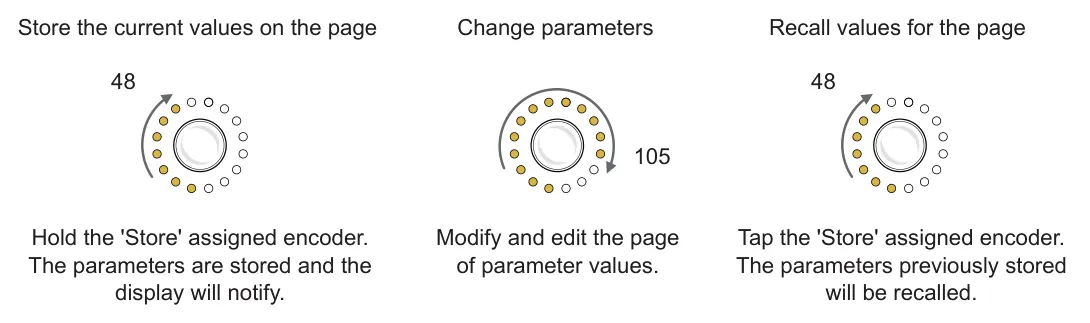
Store can be assigned to an encoder knob from within the control view when editing a control type. The Store knob is pressed to activate a store command.