



Welcome
Thank you for purchasing OXI Coral.
The introduction of the Mutable Instruments Plaits module was a revolution in compact, multi-engine synth voices. Coral builds on those open-source foundations. It packs 8 independent voices into a 14 HP module. Each voice has its own envelopes, filter and effects. The interface is colourful and organic. On top of that you get custom wavetables and a sample playback engine per voice.
But Coral is not just another polyphonic synth. The multipart concept lets you arrange the 8 voices however you like: 8 monophonic parts, one 8-voice polyphonic part, or any combination. A single Coral can be a polysynth, a drum machine, a groovebox and a sound-exploration module at the same time.
Coral firmware 3.0 introduces a new way of building your instrument. Instead of a handful of fixed engine sets, there are now 27 engines and you choose any 10 of them. The web Firmware Updater compiles that exact selection and flashes it to your Coral over USB. This manual covers that workflow, the new engines, the on-device options menu, and the companion web apps.
The OXI team
Coral is a polyphonic, multipart synthesizer voice module for Eurorack. It is polyphonic: it plays up to 8 notes at once. It is multipart: each of the 8 voices runs its own engine, listens to its own MIDI channel, and holds its own parameter values.
The simplest way to play Coral is as an 8-voice polyphonic MIDI synth. You can also play it as a single voice from CV. That is how it behaves the first time you power it on. To hear how Coral sounds, patch a Gate and a CV/Oct pair. These trigger the internal envelopes.
1.1 Specifications
| Dimensions | 14 HP, 3 cm deep |
| Panel | Black anodized aluminium with colour silkprint |
| Consumption | +12V: 110 mA · -12V: 10 mA · +5V: 0 mA |
| Outputs | 2x mono DC-coupled outputs (±5 V), used as a stereo pair |
| Inputs | 1x MIDI TRS (Type A and B compatible) · 8x CV inputs ±5 V (±10 V max) · 1x Gate input |
| Storage | Micro SD card, always in the slot. Class 10 / 70 MB/s or faster for heavy sampler use |
1.2 Panel Overview
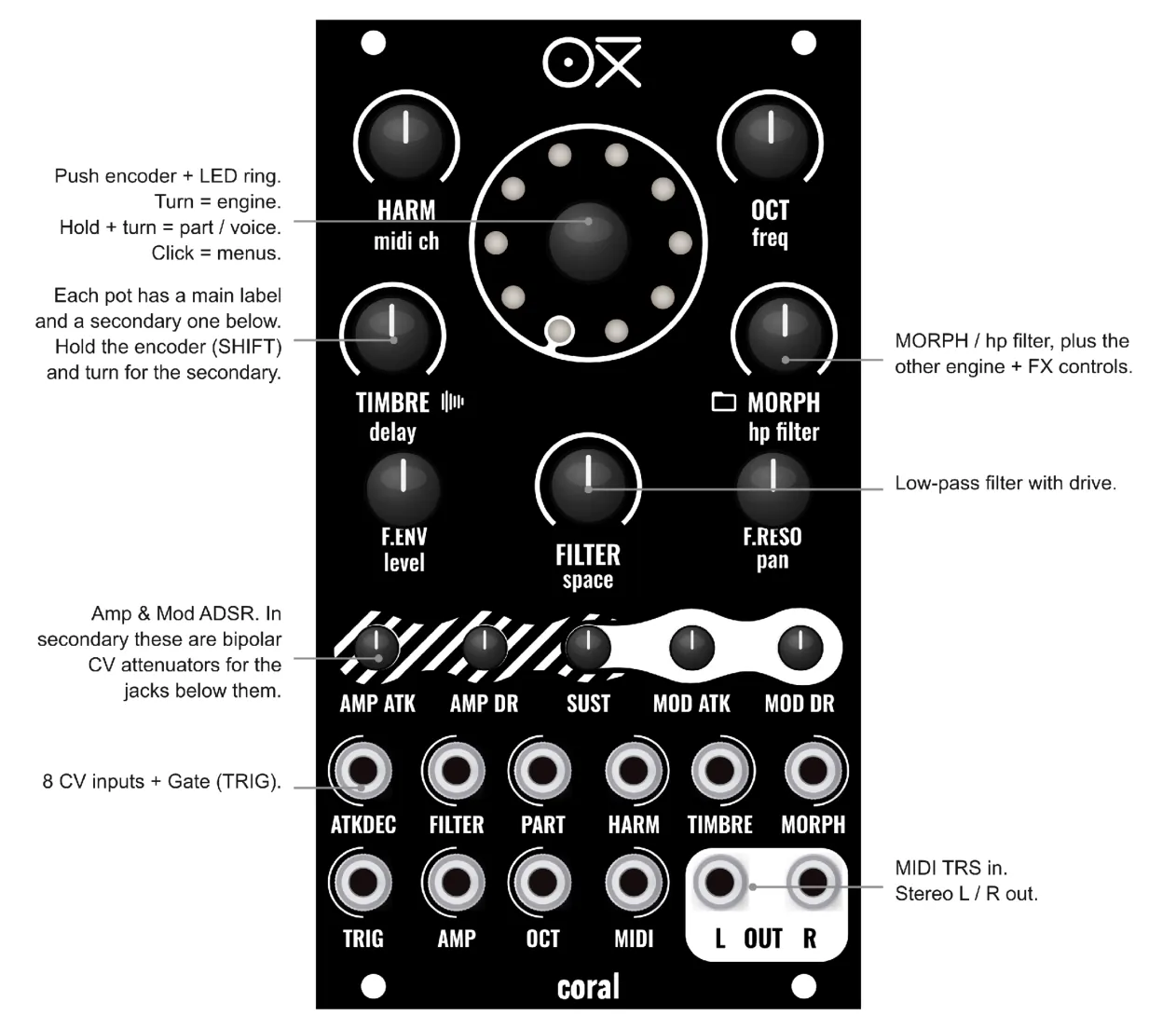
Figure 1.1. The Coral panel. Push encoder and LED ring. A main label and a secondary label on each pot. HARM, OCT, TIMBRE and MORPH pots. LP filter with drive. Amp and Mod ADSR controls, which also work as CV attenuators. SD card slot. 8 CV inputs and Gate. MIDI input. Stereo L and R outputs.
- Encoder with push button. Turn to select the engine. Push and hold, then turn, for voice / part selection. Push and hold plus turn a pot to reach that pot’s secondary parameter. Click to step through the LOAD, SAVE, CV routing and options screens (Chapter 2).
- Micro SD card. Always keep it in the slot. You need a fast card (Class 10 or higher) for heavy sampler use.
- CV inputs. Affect the selected part (all voices by default). A part can be addressed with the Part CV jack or in the CV Assign screen. The ADSR trimmers double as bipolar CV attenuators in their secondary function.
- LED ring. Visual feedback for every screen. By default each LED shows the amplitude of one voice.
1.3 Powering Up
- Make sure the factory Micro SD card is inserted.
- Mount Coral in a powered Eurorack case with the ribbon cable oriented correctly (red stripe to -12V).
- Power on. The LED ring shows voice activity in the main view.
- Send notes on MIDI channel 1. You can also patch a Gate to the trigger input and a CV to the OCT input. Then play.
NOTE By default all 8 voices listen to MIDI channel 1 and are assigned as one part. This is the best starting point.
1.4 Signal Flow
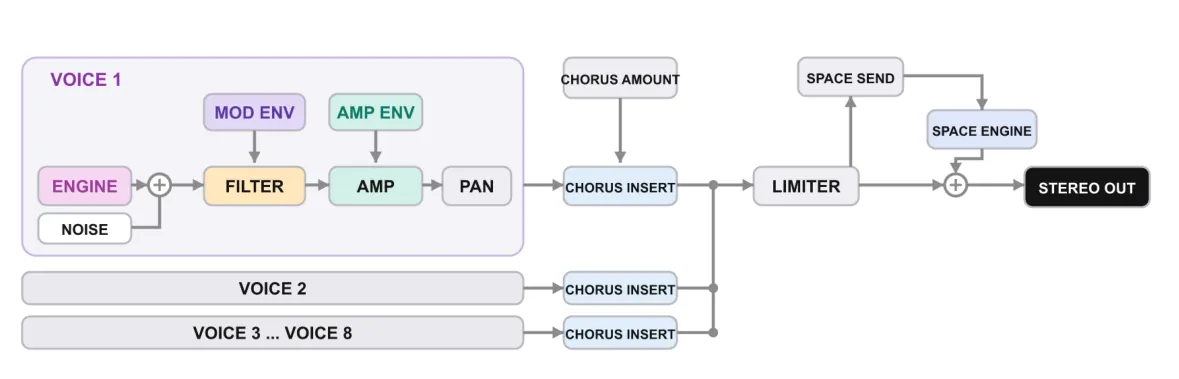
Figure 1.2. Per-voice signal chain. Engine and Noise go into the Filter, then the Amp, then Pan. The Mod and Amp envelopes shape the Filter and the Amp. Each voice has its own Chorus insert. The Limiter sums all 8 voices. The Space reverb is a send and return, then the stereo output.
Each voice runs its engine and an independent noise source through a low-pass filter and an amplifier. The Mod and Amp envelopes shape it. Coral then pans it. The chorus works per voice. A limiter sums all voices. The Space (reverb) engine is a shared send. The result reaches the stereo output.