



An engine is the sound generator inside a voice. Coral firmware 3.0 ships 27 engines. You choose any 10 of them when you build your firmware in the Firmware Updater (Chapter 9). The 10 you pick fill the 10 slots on the engine-selection ring, in the order you set. This chapter documents all 27 so you can decide what to load.
NOTE The sampler (WAVPLAYER) is one of the 27 engines, not a separate mode. Some engines are heavier than others, so not every combination of 10 fits. The Updater shows live Flash and RAM meters. It tells you before you build.
The three engine knobs. HARM, TIMBRE and MORPH are Engine Parameters 1, 2 and 3. What they do changes per engine, and is listed with each engine below. Over MIDI they are CC 11, 12 and 13.
5.1 Analog and Subtractive
VIRTUAL ANALOG
Classic two-oscillator subtractive analog. The second oscillator is synced to the first.
| Knob | Parameter | Does |
|---|---|---|
| HARM | Engine Parameter 1 | Oscillator detune, following musical intervals |
| TIMBRE | Engine Parameter 2 | Square shape, from narrow pulse to full square to hard-sync formants |
| MORPH | Engine Parameter 3 | Saw shape, from triangle to saw with a widening notch |
3-VCO ANALOG
Three variable-saw oscillators that morph from triangle to saw to square to pulse with dynamic PWM. Two of the three can be detuned against the main oscillator.
| Knob | Parameter | Does |
|---|---|---|
| HARM | Engine Parameter 1 | Oscillator 2 detune (calibrated to land on intervals such as +7 and +12) |
| TIMBRE | Engine Parameter 2 | Waveform of the oscillators (triangle, saw, square, PWM) |
| MORPH | Engine Parameter 3 | Oscillator 3 detune |
SH-101
Monophonic SH-101 voice with a sub-oscillator.
| Knob | Parameter | Does |
|---|---|---|
| HARM | Engine Parameter 1 | Sub tuning |
| TIMBRE | Engine Parameter 2 | Waveform and pulse-width |
| MORPH | Engine Parameter 3 | Sub level |
MDO
Multiple Detuned Oscillator: 8 detuned oscillators per voice morphing between saw, square and PWM.
| Knob | Parameter | Does |
|---|---|---|
| HARM | Engine Parameter 1 | Detuning amount |
| TIMBRE | Engine Parameter 2 | Waveform morph, saw to square |
| MORPH | Engine Parameter 3 | PWM of the square waveform |
MDO2
A thicker multi-oscillator swarm.
| Knob | Parameter | Does |
|---|---|---|
| HARM | Engine Parameter 1 | Detune spread |
| TIMBRE | Engine Parameter 2 | Waveform |
| MORPH | Engine Parameter 3 | Voice count |
OB-VA
Oberheim-style virtual-analog poly voice with a Curtis-style multimode filter and analog drift.
| Knob | Parameter | Does |
|---|---|---|
| HARM | Engine Parameter 1 | Detune / spread |
| TIMBRE | Engine Parameter 2 | VCO combination (upper half of the range = unison) |
| MORPH | Engine Parameter 3 | Filter slope, 4-pole to 2-pole |
NOTE Set the obvspr option to 1 for per-voice analog spread (Chapter 8). This gives a subtle drift between voices.
5.2 Waveshaping and Additive
WAVESHAPE
An asymmetric triangle processed by a waveshaper and a wavefolder. Bright and digital.
| Knob | Parameter | Does |
|---|---|---|
| HARM | Engine Parameter 1 | Waveshaper waveform |
| TIMBRE | Engine Parameter 2 | Wavefolder amount |
| MORPH | Engine Parameter 3 | Waveform asymmetry |
ADDITIVE
Harmonic / additive synthesis with two kinds of distortion: wavefolding and diode emulation. Ranges from mild tones to heavily distorted basslines.
| Knob | Parameter | Does |
|---|---|---|
| HARM | Engine Parameter 1 | Harmonic content center |
| TIMBRE | Engine Parameter 2 | Wavefolding amount |
| MORPH | Engine Parameter 3 | Diode distortion amount |
5.3 FM
2-OP FM
Two sine-wave operators modulating each other’s phase: bells, keys and metallic tones.
| Knob | Parameter | Does |
|---|---|---|
| HARM | Engine Parameter 1 | Frequency ratio |
| TIMBRE | Engine Parameter 2 | Modulation index (FM depth) |
| MORPH | Engine Parameter 3 | Feedback: operator 2 modulating its own phase (past 12 o’clock, rough) or operator 1 (before 12 o’clock, chaotic) |
FMX7 (DX7)
A full 6-operator FM engine that loads DX7 .syx banks from the SD card.
| Knob | Parameter | Does |
|---|---|---|
| HARM | Engine Parameter 1 | Patch: turn to step through the patches in the current bank |
| TIMBRE | Engine Parameter 2 | FM brightness |
| MORPH | Engine Parameter 3 | Juno-60 chorus (Mode I+II), a shared post-mix BBD chorus. 0 is dry and CPU-free. Turn it up for the classic wide Juno wobble |
| Polyphony | Limited to 6 voices (other engines: 8). A 7th note steals the oldest. |
| Patches | .syx files in the SD folders DX7 Patches/Group 1 to 10. Each folder is one bank. |
| Change bank | Click the encoder once: the ring lights one lime dot for the current bank. Turn to another bank, click to return to playing. HARM then browses that bank. |
| Per part | The bank and the patch belong to the part. Several FMX7 parts can run completely different DX7 sounds at the same time. A bank change on one part leaves the others alone. |
| Saved | The preset stores the bank next to HARM. A DX7 sound needs both to identify it, so both travel with the preset. They also survive a switch to another engine and back. |
| Slides | Tied / legato notes glide on a mono part. Accent via note velocity. |
5.4 Wavetable
WAVETABLE
Scans wavetables loaded from the SD card. HARM, TIMBRE and MORPH move through the Z, X and Y dimensions; three waves are combined and cross-faded.
| Knob | Parameter | Does |
|---|---|---|
| HARM | Engine Parameter 1 | Z axis |
| TIMBRE | Engine Parameter 2 | X axis |
| MORPH | Engine Parameter 3 | Y axis |
| Files | .wav wavetables (27 x 512 waves, 48 kHz 16-bit) in the SD Wavetables/ folder, up to 96. Make your own in the Waveform Generator (Chapter 9). |
| Browse | Click the encoder: the first stop (dark-yellow arc) picks the wavetable. Turn to scrub, click to exit. |
| Memory | The wavetable persists across power cycles, and each saved preset remembers its own. |
DUAL WAVETABLE
Two detuned wavetable oscillators for complex lead sounds.
| Knob | Parameter | Does |
|---|---|---|
| HARM | Engine Parameter 1 | Detune between the two oscillators, following musical intervals |
| TIMBRE | Engine Parameter 2 | Table position of oscillator 1 |
| MORPH | Engine Parameter 3 | Table position of oscillator 2 |
WAVETABLE SWARM
A supersaw-style swarm of wavetable voices.
| Knob | Parameter | Does |
|---|---|---|
| HARM | Engine Parameter 1 | Detune spread |
| TIMBRE | Engine Parameter 2 | Table position (browse as in WAVETABLE) |
| MORPH | Engine Parameter 3 | Voice count |
5.5 Acid
ACID 1
The original 303-style acid bass. Frozen and unchanged for compatibility.
| Knob | Parameter | Does |
|---|---|---|
| HARM | Engine Parameter 1 | Overdrive |
| TIMBRE | Engine Parameter 2 | Waveform, saw to square |
| MORPH | Engine Parameter 3 | Accent |
ACID 2
Our faithful 303 rework. A variable-shape oscillator through a finely-tuned gritty filter, with four distortion zones and an optional Devilfish mode. 4-voice polyphonic (a 5th note steals the oldest).
| Knob | Parameter | Does |
|---|---|---|
| HARM | Engine Parameter 1 | Distortion zone (sweeps; the LED ring shows the zone) |
| TIMBRE | Engine Parameter 2 | Waveform, saw to square |
| MORPH | Engine Parameter 3 | Accent amount |
| Zone | Sound | Good for |
|---|---|---|
| SCREAMER | Smooth classic acid overdrive | Your default; keep low for clean lines |
| VALVE | Warm tube saturation, never harsh | Melodic lines, slower acid |
| MIXER | Overdriven desk channel | The acid-techno scream: high reso, sweep the cutoff |
| OCTAFUZZ | Octave-up fuzz | Basslines that scream an octave above |
Zones cross-fade, so park between two for hybrids. To glide, use a CV/Gate pair and change the pitch while the gate is high. On a mono MIDI part, send legato notes. Accents come from note velocity or the Amp CV.
NOTE Turn on Devilfish by setting devfsh 1 in options.txt (Chapter 8) for a sub-oscillator, fatter resonance and hotter drive.
5.6 Keys, Strings and Physical Models
STRING 2
A string-machine voice: strings, brass, organ and choir, with an ensemble and phaser. Supports one-finger smart chords.
| Knob | Parameter | Does |
|---|---|---|
| HARM | Engine Parameter 1 | Registration |
| TIMBRE | Engine Parameter 2 | Ensemble |
| MORPH | Engine Parameter 3 | Phaser |
NOTE Smart chord: turn it on in the options ring (LED 10). The lowest note you hold sets the key. A single note then plays a diatonic chord. The encoder feature stop picks the scale. MORPH sets the voicing, from octave and fifth up to a full spread.
PIANOZ
A rompler voice: house piano, Rhodes electric piano and drawbar organ, streamed from the SD card.
| Knob | Parameter | Does |
|---|---|---|
| HARM | Engine Parameter 1 | Instrument: piano (LEDs 1 to 3), Rhodes (LEDs 4 to 7), organ (LEDs 8 to 10) |
| TIMBRE | Engine Parameter 2 | Octave stack: right fades an octave up (bright), left a sub octave (deep). On organ, left is the 16′ sub bar, right the sparkle bars. |
| MORPH | Engine Parameter 3 | Lo-fi crush: clean at 0, vintage grit by a quarter turn, full crush at max |
NOTE PIANOZ streams HOUSEKEYS.PCM and RHODES.PCM from the System/ folder on the SD card. The Coral Factory package includes them (Section 8.1).
NOTE PIANOZ also supports smart chord (options ring, LED 10), with the same 9-scale picker as String 2.
STRING
Physical-model plucked and bowed string / resonator.
| Knob | Parameter | Does |
|---|---|---|
| HARM | Engine Parameter 1 | Material (amount of inharmonicity) |
| TIMBRE | Engine Parameter 2 | Excitation brightness and dust density |
| MORPH | Engine Parameter 3 | Decay time (energy absorption) |
MODAL
Physical-model resonant bodies and mallets.
| Knob | Parameter | Does |
|---|---|---|
| HARM | Engine Parameter 1 | Structure |
| TIMBRE | Engine Parameter 2 | Excitation brightness |
| MORPH | Engine Parameter 3 | Decay / damping |
5.7 Noise and Drums
PARTICLE NOISE
Granular particle and noise clouds.
| Knob | Parameter | Does |
|---|---|---|
| HARM | Engine Parameter 1 | Frequency spread |
| TIMBRE | Engine Parameter 2 | Density |
| MORPH | Engine Parameter 3 | Resonance |
FILTERED NOISE
Tuned, filtered noise.
| Knob | Parameter | Does |
|---|---|---|
| HARM | Engine Parameter 1 | Pitch / mode |
| TIMBRE | Engine Parameter 2 | Cutoff |
| MORPH | Engine Parameter 3 | Resonance |
SNARE / HI-HAT
A combined snare and hi-hat voice.
| Knob | Parameter | Does |
|---|---|---|
| HARM | Engine Parameter 1 | Harmonic / noise balance |
| TIMBRE | Engine Parameter 2 | Body / hi-hat high-pass |
| MORPH | Engine Parameter 3 | Snare to hi-hat crossfade |
HI-HAT
Analog-style hi-hat: two models blended.
| Knob | Parameter | Does |
|---|---|---|
| HARM | Engine Parameter 1 | Metallic / filtered-noise balance |
| TIMBRE | Engine Parameter 2 | High-pass cutoff |
| MORPH | Engine Parameter 3 | Crossfade between the two models |
SNARE
Analog-style snare: two models blended.
| Knob | Parameter | Does |
|---|---|---|
| HARM | Engine Parameter 1 | Harmonic / noisy balance |
| TIMBRE | Engine Parameter 2 | Body / noise components |
| MORPH | Engine Parameter 3 | Crossfade between the two models |
BASSDRUM
Analog-style kick: two models blended.
| Knob | Parameter | Does |
|---|---|---|
| HARM | Engine Parameter 1 | Attack sharpness and overdrive |
| TIMBRE | Engine Parameter 2 | Brightness |
| MORPH | Engine Parameter 3 | Crossfade between the two models |
On the drum engines you can send CV modulation to any parameter. Use the velocity or mod outputs of a sequencer, for example. Over MIDI you can play with velocity. The Mod decay (SHIFT) changes the internal envelope decay. The Amp decay refines the amplitude.
5.8 Generative Drone
STITCHER
A generative drone looper, and the one engine that plays by its own rules. Stitcher holds a 2 second window of a sample in memory and chops it into three independent loops. Every re-roll rebuilds each loop as a fresh arrangement of slices. The slices use mixed musical lengths, shuffled order, repeats and reversals. Each slice has its own level, pan and pitch. Slices are played like an oscillator rather than gated, so the result flows instead of stuttering.
Read this before you reach for the knobs. On Stitcher the OCT knob is not pitch, and HARM, TIMBRE and MORPH are not the usual engine parameters. They are the levels of the three loops.
| Control | On STITCHER |
|---|---|
| OCT · the big knob | The main control, and not pitch on this engine. Any meaningful move re-rolls the whole arrangement, and its position sets the density. MIDI CC 6 drives it too. |
| HARM / TIMBRE / MORPH | Level of loop 1 / 2 / 3. The three loops are roles rather than copies: percussive, spacey and smeared, so they behave like three different players. |
| MOD ATK | Bipolar rhythm to texture morph. Centre is neutral. One way gives short slices, rests and a wide pitch spread. The other gives long overlapping slices that sit with the root. |
| MOD DR | Its normal Coral mod-decay job. |
| Keys / CV note | Pitch the material. Stitcher is a single-voice texture engine. |
Picking a sample
The first encoder click opens the sample browser, shown as a yellow arc. Turn to scrub through the WAV files in your Stitcher folder, then click to exit. Position 0 is the built-in generator, so the engine makes sound even with an empty folder. Your choice is remembered across power cycles.
NOTE Coral creates the Stitcher folder at the root of the SD card on boot, so there is nothing to set up. Copy your WAV files straight into it. That folder at the card root is the only place Stitcher reads, and it does not look inside subfolders. A long file is fine. Each re-roll can take its 2 second window from anywhere in the file. One sample goes a long way.
TIP The Coral Factory package puts a set of sounds in the Stitcher folder (Section 8.1). You can add your own. Stitcher also plays with an empty folder, using its built-in generator at position 0.
The FX ring
A second encoder press opens the Stitcher FX ring: three live toggles you can flip while it plays. A slot at full brightness is on, dim is off. The settings are saved on the device, so they survive a reboot. Hold about 1 second to exit, or leave it and it closes after about 4 seconds.
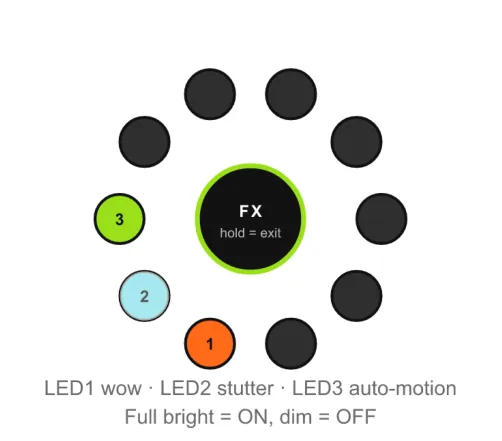
Figure 5.1. Stitcher FX ring: LED1 tape wow and flutter, LED2 stutter and re-trigger bursts, LED3 auto-motion. Full brightness is on, dim is off.
| LED | FX | What it does |
|---|---|---|
| 1 | Tape wow and flutter | Slow pitch and speed wobble, like tape. |
| 2 | Stutter | Re-trigger bursts across the arrangement. |
| 3 | Auto-motion | The big knob turns itself, so the arrangement keeps re-rolling on its own. |
TIP For a hands-off generative patch, pick a sample. Set the three loop levels to taste. Turn on auto-motion (LED 3). Coral then rebuilds the arrangement by itself.
5.9 Sampler
WAVPLAYER
Plays your .wav samples from the SD card. Any bit depth, sample rate, length, mono or stereo. One-shot playback, polyphonic.
| Knob | Parameter | Does |
|---|---|---|
| HARM | Engine Parameter 1 | Overdrive |
| TIMBRE | Engine Parameter 2 | Sample selection |
| MORPH | Engine Parameter 3 | Folder selection |
Organize samples in up to 10 folders with 32 samples each. Coral ignores empty folders. It orders folders and samples alphabetically. You can modulate the sample and folder selection. Coral supports 16, 24, 32 and 32-float bit depths, at 44.1 or 48 kHz. Samples pitch up 18 semitones and down 24, by a change of playback speed. There is no time-stretching.
CAUTION Heavy sampler use can still produce artifacts under load. Card speed matters most. Use a U3 card. Keep samples at 48 kHz 16-bit. Use fewer voices on the sampler at once.